> ## Documentation Index
> Fetch the complete documentation index at: https://docs.hologrow.ai/llms.txt
> Use this file to discover all available pages before exploring further.
# 领星 ERP
> 连接准备、操作步骤与常见问题。
领星 ERP 可将店铺、Listing、销售和库存数据同步到 Hologrow。连接需要领星 OpenAPI 的 **App ID** 和 **App Secret**。
## 1. 登录领星 ERP
使用**超级管理员账号**登录[领星 ERP 后台](https://erp.lingxing.com/login)。
## 2. 打开开放接口
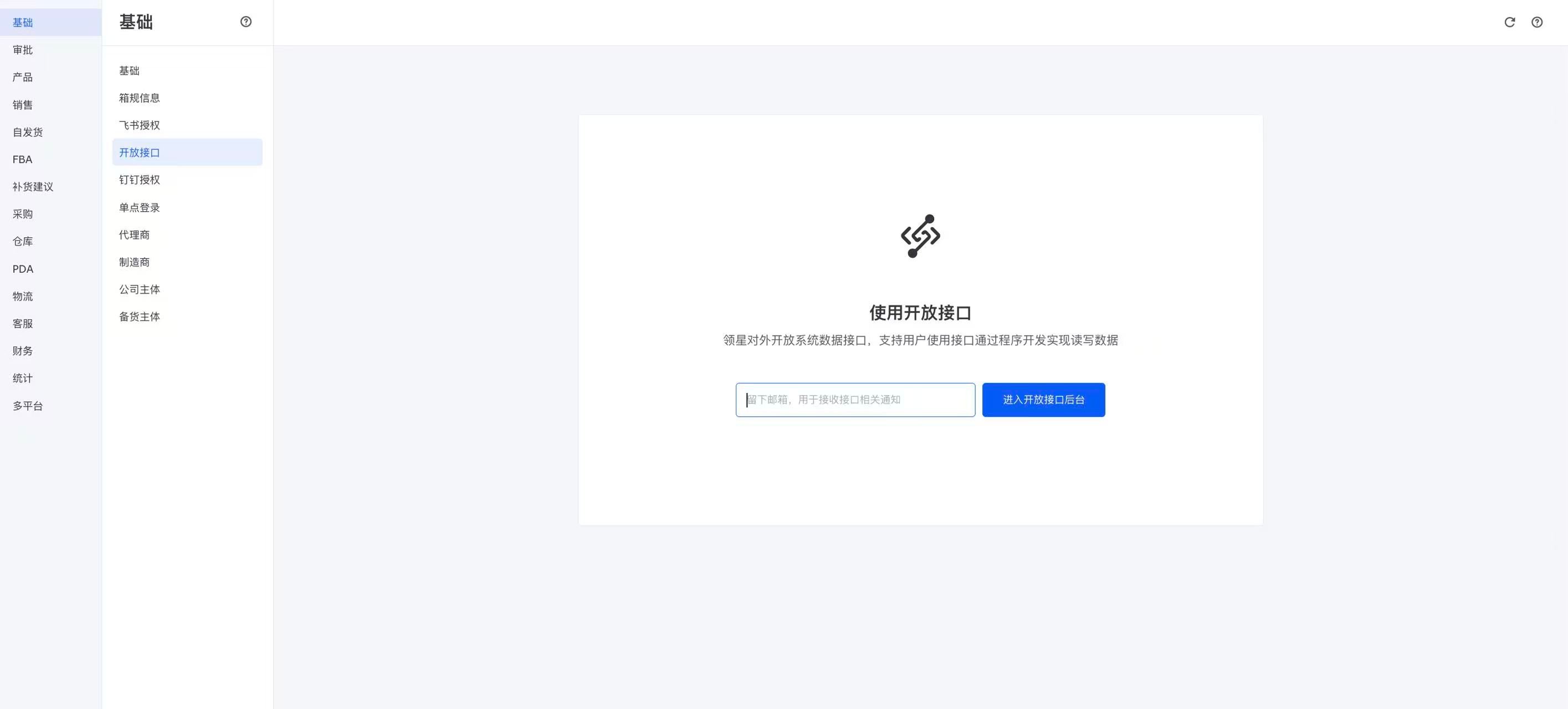
进入 **设置 → 业务配置 → 开放接口**。部分版本的路径为 **业务配置 → 全局 → 开放接口**。
首次使用时,填写用于接收 Open API 通知的邮箱,点击 **进入开放后台**(界面也可能显示“进入开放接口后台”)完成初始化。非首次使用时,直接进入开放后台。
 ## 3. 添加 IP 白名单
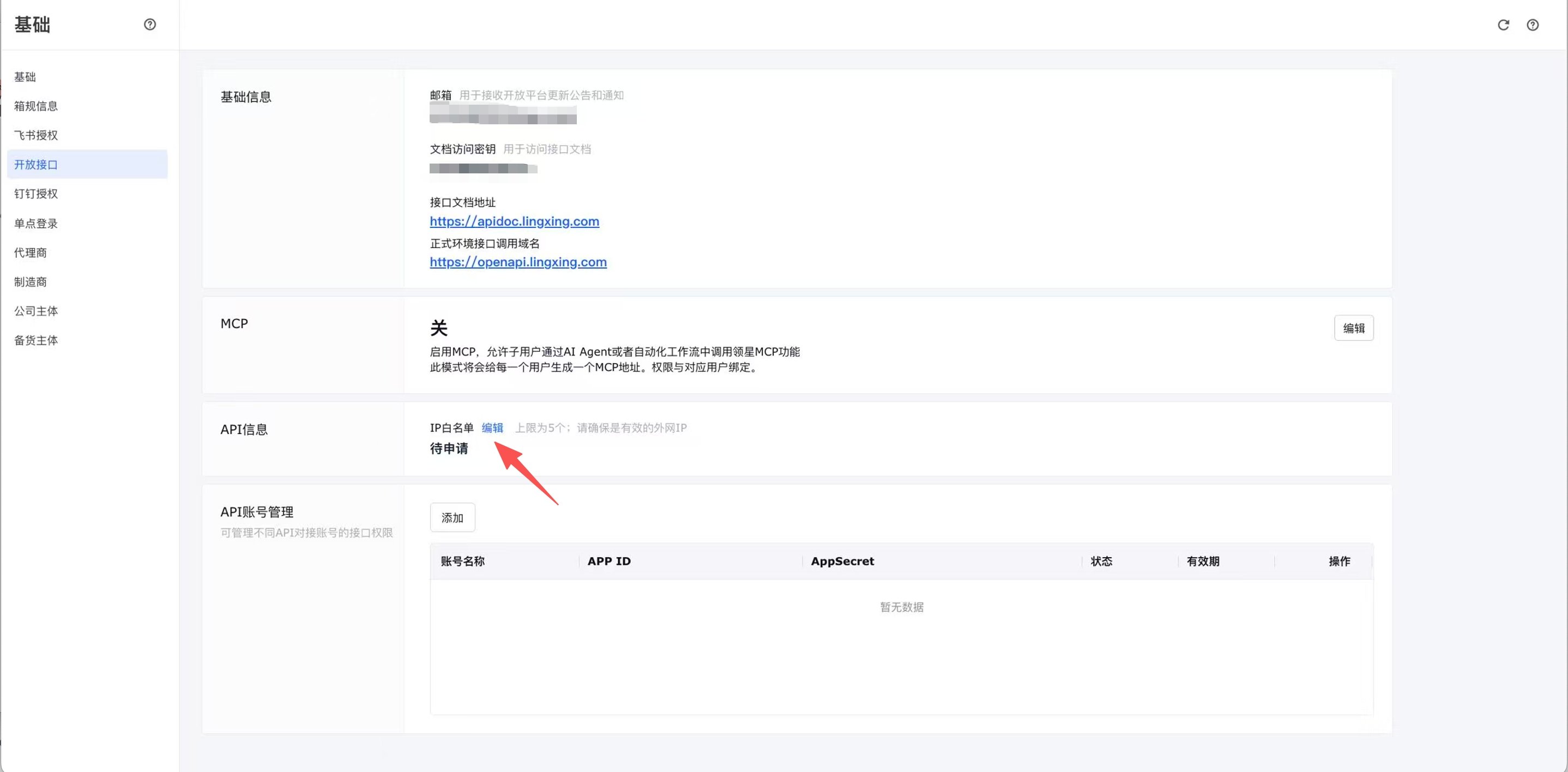
在开放后台的 **API 信息** 区域,找到 **IP 白名单**,点击 **编辑**。
## 3. 添加 IP 白名单
在开放后台的 **API 信息** 区域,找到 **IP 白名单**,点击 **编辑**。
 添加 Hologrow 的 IP 地址 35.208.2.181,然后点击 **保存**。已有其他系统的白名单时,新增此地址,保留原有条目。
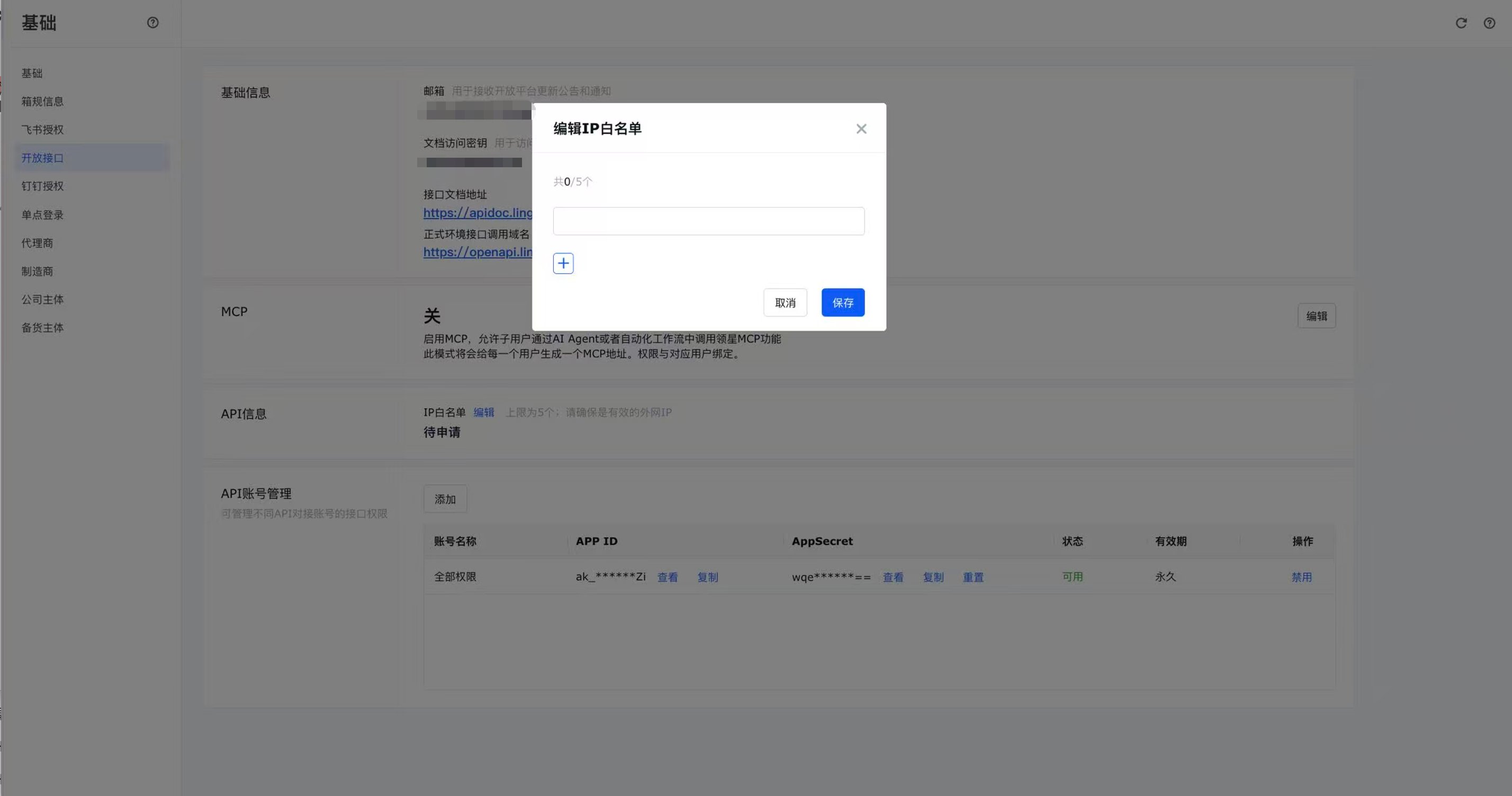 截图仅用于说明操作位置。实际应填写的 Hologrow 白名单 IP 为 **35.208.2.181**。
## 4. 创建 API 账号并配置权限
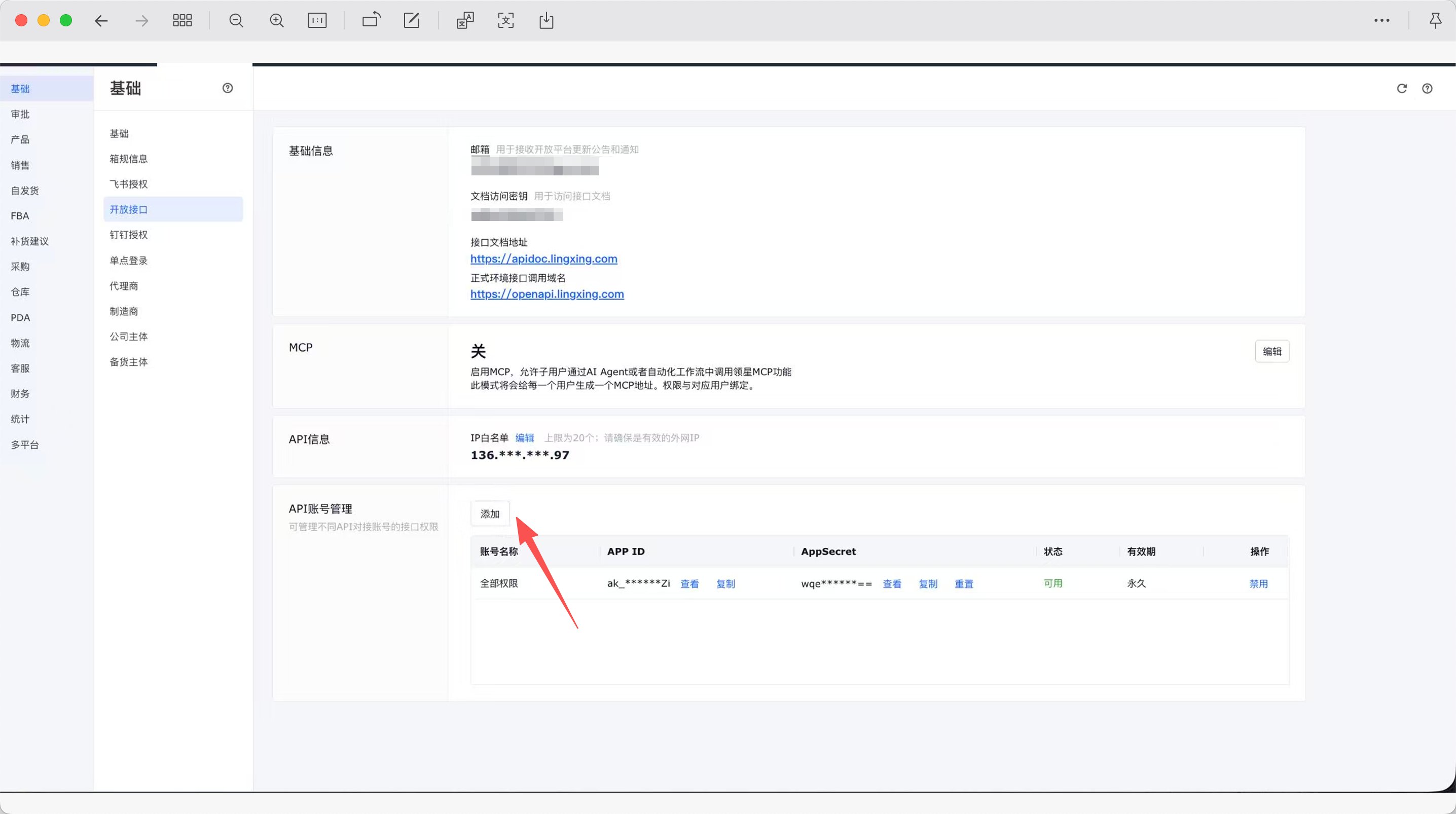
在 **API 账号管理** 区域点击 **添加**,填写账号信息并勾选需要同步的数据所对应的接口权限,然后保存。
**未勾选的接口权限无法调用。** 请确认需要的店铺、Listing、销售和库存接口已获授权;若缺少某类数据,先检查该 API 账号的接口权限。
截图仅用于说明操作位置。实际应填写的 Hologrow 白名单 IP 为 **35.208.2.181**。
## 4. 创建 API 账号并配置权限
在 **API 账号管理** 区域点击 **添加**,填写账号信息并勾选需要同步的数据所对应的接口权限,然后保存。
**未勾选的接口权限无法调用。** 请确认需要的店铺、Listing、销售和库存接口已获授权;若缺少某类数据,先检查该 API 账号的接口权限。
 ## 5. 复制 App ID 和 App Secret
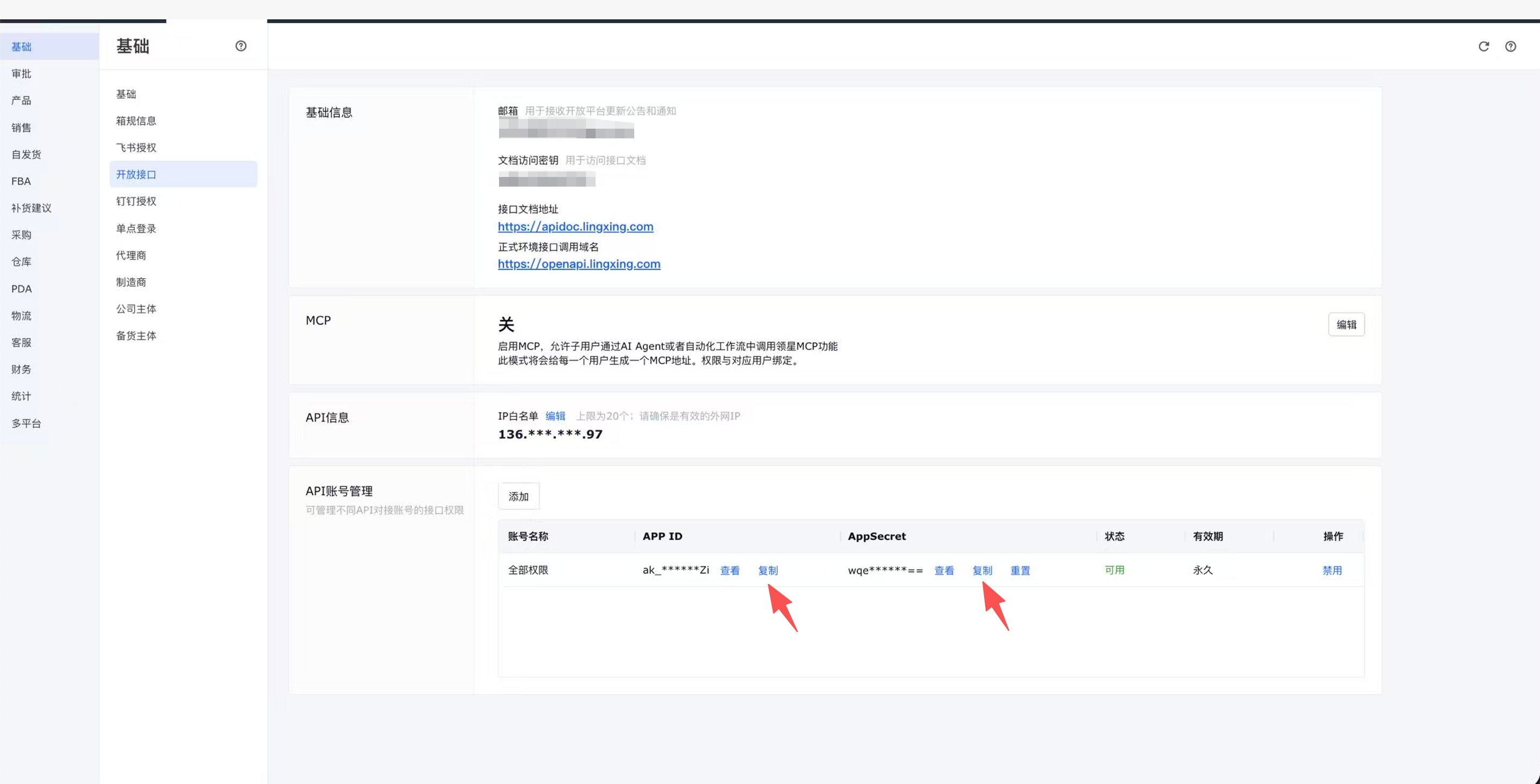
在创建好的 API 账号行中,分别点击 **APP ID** 和 **AppSecret** 旁的 **复制**。如需核对,可点击 **查看**。请使用同一个 API 账号的两项凭证,不要使用上方的“文档访问密钥”。
## 5. 复制 App ID 和 App Secret
在创建好的 API 账号行中,分别点击 **APP ID** 和 **AppSecret** 旁的 **复制**。如需核对,可点击 **查看**。请使用同一个 API 账号的两项凭证,不要使用上方的“文档访问密钥”。
 ## 6. 在 Hologrow 完成连接
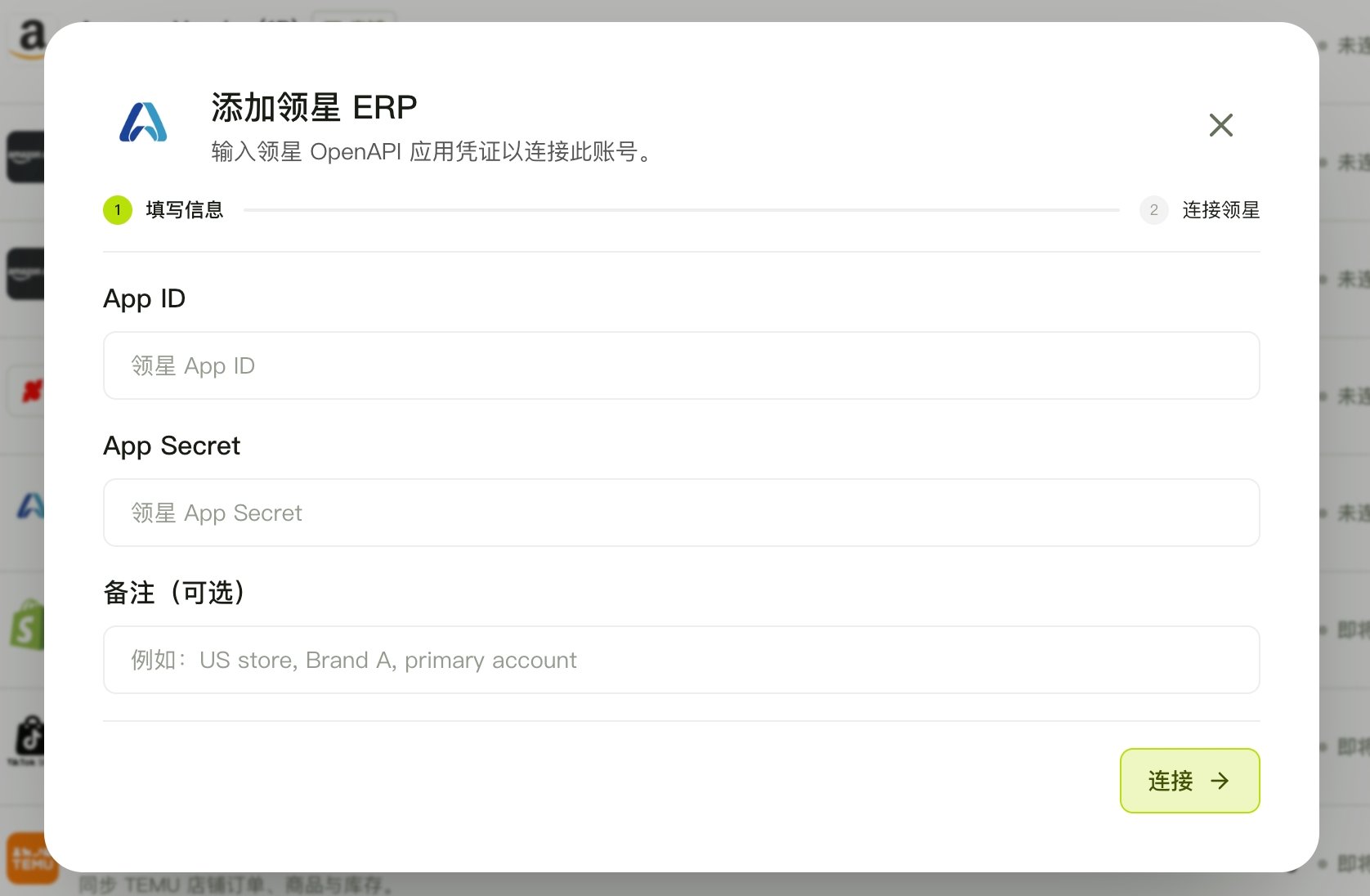
1. 打开 Hologrow 的 **链接平台**,找到 **领星 ERP**,点击 **连接**;已有连接时进入 **管理** 添加连接。
2. 将凭证分别粘贴到 **App ID** 和 **App Secret**。
3. 按需填写 **备注(可选)**,便于区分账号。
4. 点击 **连接**,等待校验完成。
## 6. 在 Hologrow 完成连接
1. 打开 Hologrow 的 **链接平台**,找到 **领星 ERP**,点击 **连接**;已有连接时进入 **管理** 添加连接。
2. 将凭证分别粘贴到 **App ID** 和 **App Secret**。
3. 按需填写 **备注(可选)**,便于区分账号。
4. 点击 **连接**,等待校验完成。
 打开 [Data Explorer(连接状态)](/zh/hologrow-basics/data-explorer),找到领星账户,确认其状态和账户名称。如果提示开始同步,确认数据设置并启动同步,再在此检查进度和可用数据表。
## 常见问题
* **找不到开放接口入口**:当前账号或店铺未开启 API 授权权限。请联系领星客服或客户经理申请开通,并确认使用超级管理员账号。
* **凭证校验失败**:确认 App ID 和 App Secret 来自同一有效 API 账号,没有多余空格,且白名单已保存 `35.208.2.181`。若密钥已重置,请更新 Hologrow 中的凭证。
* **已连接但缺少数据**:检查对应接口是否勾选权限,以及数据同步是否已启动或完成。成功连接不代表所有接口都已授权。
## 相关页面
* [返回链接平台](/zh/hologrow-basics/integrations)
* [连接 AI 工具](/zh/hologrow-basics/ai-platforms)
打开 [Data Explorer(连接状态)](/zh/hologrow-basics/data-explorer),找到领星账户,确认其状态和账户名称。如果提示开始同步,确认数据设置并启动同步,再在此检查进度和可用数据表。
## 常见问题
* **找不到开放接口入口**:当前账号或店铺未开启 API 授权权限。请联系领星客服或客户经理申请开通,并确认使用超级管理员账号。
* **凭证校验失败**:确认 App ID 和 App Secret 来自同一有效 API 账号,没有多余空格,且白名单已保存 `35.208.2.181`。若密钥已重置,请更新 Hologrow 中的凭证。
* **已连接但缺少数据**:检查对应接口是否勾选权限,以及数据同步是否已启动或完成。成功连接不代表所有接口都已授权。
## 相关页面
* [返回链接平台](/zh/hologrow-basics/integrations)
* [连接 AI 工具](/zh/hologrow-basics/ai-platforms)